
Bookmap Options Strike is an add-on that draws SPX options market-maker gamma exposure, strike by strike, as horizontal bars on an ES or MES chart, refreshed about once a minute. The data comes from OptionsDepth, built from Cboe trades tagged by participant, so it shows market makers’ actual net positions rather than an open-interest estimate.
I publish GEX levels twice a day on Scott’s GEX Levels; they are free there 48 hours after each run, and members get the current ones the minute they are computed. This add-on puts the whole profile on the chart and refreshes it every minute. It’s new (Bookmap’s guide was updated in October 2026), so this isn’t a years-of-use page. It’s what it does and how I read it next to my levels.
Which plan: Global Premium (monthly or annual; lifetime Premium includes it for the first year only), or $99 a month on its own on the Bookmap Marketplace. The options data is included in that price.
Options Strike is in Global Premium or $99 a month on the Marketplace. If you want the heatmap first, the Global Plus offer ($147 for the first quarter) is the cheaper start. Prices checked 7 November 2026. Try Bookmap free first (the free tier is a look at the software, not live futures).
Affiliate link. Bookmap pays me a commission if you subscribe; it costs you nothing extra, and I was paying full price for years before the link existed.
How do I read Bookmap Options Strike?
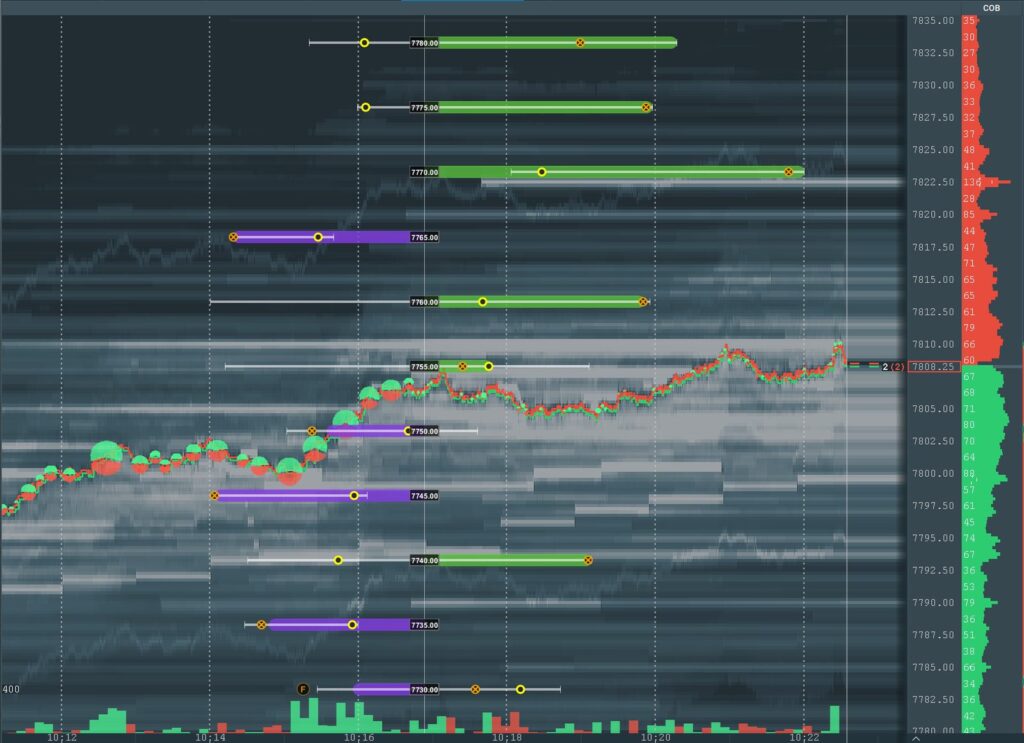
- Green bar extending right: market makers are long gamma at that strike. Their hedging tends to slow price down there. Think brake.
- Purple bar extending left: market makers are short gamma. Their hedging tends to speed price up. Think accelerator.
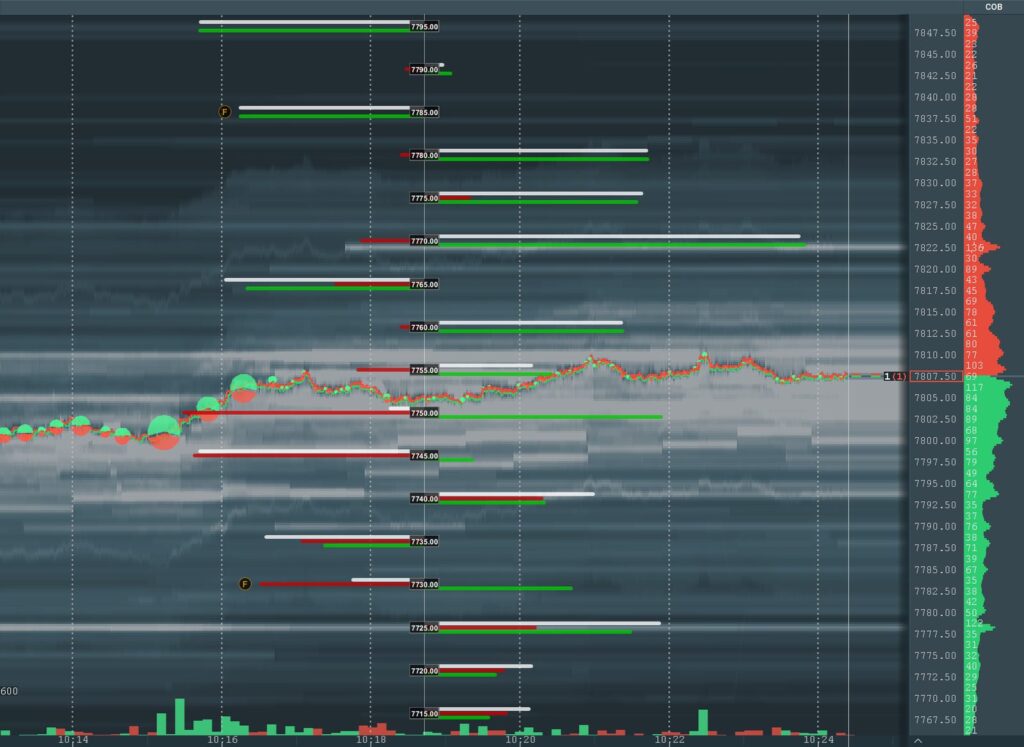
- Bar length: size, relative to the other strikes on screen.
- Candle profile (the default): the body is the latest value, the wick is the day’s range. Simple bars splits calls, puts and net.
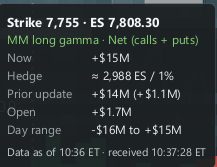
Hover a strike and a card shows the dollar change in market-maker delta per one-point SPX move, and roughly how many ES contracts their hedge is per 1% move.
How I read it next to my levels
Where my published call wall or put wall lines up with a long green bar, the brake is there right now, not just in this morning’s numbers. Where price is sitting in a purple stretch, I expect levels to give way faster than usual.
Bookmap’s own advice is the right one: the profile shows where hedging is likely, the order flow shows what traders are doing there now. A long-gamma strike with a big resting wall on the heatmap is a stall candidate. A short-gamma zone with a thin book is where things move fast. It’s the same rule as everything else on my screen: it can veto, it never generates.
Where does the Options Strike data come from?
OptionsDepth builds it from Cboe’s SPX trades, which are tagged by participant, so it tracks real market-maker net positions. Bookmap fetches it once a minute. Cboe delivers each minute up to about 90 seconds late, so the “Data as of” time trails the clock by a minute or two.
SPX and ES trade a few points apart, so the add-on shifts every strike onto the ES price. Auto measures that gap live (ES minus SPX); Manual lets you type an offset or a ratio.
When does Options Strike update?
| New York time | What you see |
|---|---|
| 04:00 to 09:25 | A new snapshot about once a minute |
| 09:25 to 09:30 | Nothing published (no SPX trades in that window) |
| 09:30 to 17:00 | A new snapshot about once a minute |
| 17:00 to 04:00 next trading day | The 17:00 snapshot stays on screen |
| Weekends and holidays | The last 17:00 snapshot |
For anyone trading Globex: the bars you see at 9 pm are the 5 pm picture. Useful, but it’s yesterday’s afternoon, not tonight.
Options Strike vs Scott’s GEX Levels
| Scott’s GEX Levels | Bookmap Options Strike | |
|---|---|---|
| Price | Free after 48 hours; current levels for members | $99 a month on the Marketplace, or in Global Premium |
| Updates | Twice a trading day: 09:07 and 17:37 ET | About once a minute, 04:00 to 17:00 ET |
| What you get | 14 named levels: call wall, put wall, zero gamma, G±2, G±3, and the same for 0DTE | Market-maker gamma at every strike, with size |
| Source | Public CBOE option chains | OptionsDepth, from Cboe participant-tagged SPX trades |
| Instruments | ES and NQ | ES and MES |
| Where it works | Any chart: TradingView string, Bookmap Cloud Notes | Bookmap only |
They don’t compete. Mine is a daily map for any chart, free on the site after 48 hours; this is the live, every-strike version for ES on Bookmap. If you trade Bookmap, my levels can sit on the same heatmap: my GEX levels in Bookmap Cloud Notes.
Flip detection and the 0DTE switch
0DTE or All expirations: 0DTE shows only options expiring today, and switches to the day’s expiries at the 04:00 snapshot. All shows the whole book. Late in the day, 0DTE strikes near price usually matter most.
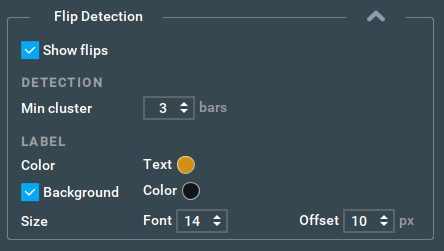
Flip detection (off by default) puts a bold F on the strike where the profile changes sign after a run of same-sign strikes. Min cluster sets how many in a row count; the default is 3. The hover card then says Gamma flip, long to short or short to long.
Set up Options Strike in five steps
- Get it: Global Premium, or Options Strike on its own from the Bookmap Marketplace.
- Open the Addons Manager in Bookmap and install the add-on called Options Strike.
- Open an ES or MES chart. Anything else shows an amber “not supported” banner.
- Pick 0DTE or All expirations, and Candle profile or Simple bars.
- Leave price conversion on Auto unless you have a reason not to. Bookmap’s Options Strike guide has the rest.
My screen and settings
Screenshot of my own layout and the settings I run are on the way; until then, Bookmap’s pictures above are the honest version.
Questions people ask
Do I need to understand options to use Options Strike?
Not much. Green means market makers’ hedging tends to slow price there; purple means it tends to speed it up; a longer bar means more of it. Bookmap’s free gamma exposure guide takes about ten minutes if you want the theory.
Does Options Strike work on MES?
Yes. It works on ES and MES only, and on MES the hover card converts to MES contracts.
What about NQ?
Not supported: any chart other than ES or MES shows an amber “not supported” banner. For NQ, my GEX levels cover NQ twice a day: free on the site 48 hours after each run, current for members.
Which Bookmap plan includes Options Strike?
Global Premium monthly or annual. Lifetime Premium includes it for the first year only. On its own it’s $99 a month on the Bookmap Marketplace, and the options data is included in that price.
Why don’t the bars change at night?
Bookmap publishes about once a minute from 04:00 to 17:00 New York time. The 17:00 snapshot then stays on screen until 04:00 the next trading day.
Is Options Strike financial advice?
No, and neither is this page. Bookmap calls the profile context, not a signal, and so do I: it shows where hedging is likely, and the order flow shows what’s happening there.
Next: GEX levels in Cloud Notes · Back to the Bookmap Library · Which Bookmap plan?
Offer and prices as above, checked 7 November 2026. Try Bookmap free first
Disclosure. VWAP.biz is an independent site written by Scott West, a paying member of Drysdale Trading Group™. The VWAP Wave System™ is Chris Drysdale’s work. He doesn’t own or run this site, but he has reviewed and endorsed it. Links to his book, toolkit, and community are affiliate links: if you buy through them I may earn a commission at no extra cost to you. As an Amazon Associate I earn from qualifying purchases. Nothing here is financial advice, and trading futures carries a risk of loss. Full disclosure · Risk disclaimer