
Bookmap Orderbook Imbalance is an add-on that compares the resting size on the bid with the size on the ask and shows the ratio as a widget: positive when bids dominate the book, negative when asks do. It’s calculated from the order book visible on the right of your chart, over the range of price levels you choose.
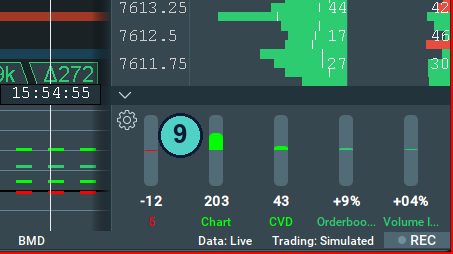
In my layout it’s the Orderbook gauge in the widget row at the bottom right, number 9 in my screenshot, reading +9% in that picture. It flags an imbalance before I’ve gone looking for one.
Which plan: included from Global Plus (on Global it works in replay only). You can try it free on any tier in replay mode or on a delayed instrument.
$147 for your first quarter or $588 for the first year (then $297 a quarter or $948 a year), 14-day money back on this offer. Prices checked 7 November 2026. All plans and prices. The free tier is a look at the software, not live futures.
Affiliate link. Bookmap pays me a commission if you subscribe; it costs you nothing extra, and I was paying full price for years before the link existed.
How is Orderbook Imbalance calculated?
(bid size − ask size) ÷ (bid size + ask size), over the order book on the right edge of the chart. Drag the chart back in time and it recalculates for that slice of the book. The number shows in the buyer colour when positive and the seller colour when negative.
You choose the price range it covers: a number of levels, a percentage from the best bid and ask, or the whole book. Farther levels can count for less, and a sound alert can fire at a percentage you set.
How I read order book imbalance
The book is where people say what they’ll do. Imbalance is how loudly each side is saying it. A strong bid reading under my long level helps. A strong one that flips negative as price arrives is the same trap the heatmap shows, in one number.
It’s the least reliable witness on my screen, because resting orders can be pulled. That’s exactly why it sits next to Volume Imbalance, which only counts orders that actually traded.
Settings worth knowing
- Price range of imbalance computation: a number of levels, a percentage from the best bid and ask, or all levels.
- Lower rate for farther levels: weights the levels near the best bid and ask more heavily.
- Sound alert: at an imbalance percentage you set.
Bookmap’s own Orderbook Imbalance guide has the rest, with pictures.
My screen and settings
Screenshot of my own layout and the settings I run are on the way; until then, the crop from my full layout above is the honest version.
Questions people ask
Which Bookmap plan includes Orderbook Imbalance?
Global Plus and Global Premium. On Global it works in replay mode only.
What’s the difference between Orderbook and Volume Imbalance?
Orderbook Imbalance measures resting orders, which can be pulled. Volume Imbalance measures trades that happened. The first is intention, the second is action.
Can I try it for free?
Yes. Bookmap lets any package use it in replay mode or on a delayed instrument.
Next: Volume Imbalance · Back to the Bookmap Library · Which Bookmap plan?
Offer and prices as above, checked 7 November 2026. All plans and prices
Disclosure. VWAP.biz is an independent site written by Scott West, a paying member of Drysdale Trading Group™. The VWAP Wave System™ is Chris Drysdale’s work. He doesn’t own or run this site, but he has reviewed and endorsed it. Links to his book, toolkit, and community are affiliate links: if you buy through them I may earn a commission at no extra cost to you. As an Amazon Associate I earn from qualifying purchases. Nothing here is financial advice, and trading futures carries a risk of loss. Full disclosure · Risk disclaimer