
Bookmap AVWAP is an add-on that draws anchored VWAP lines on the heatmap: VWAP started from a time you choose instead of the session open, with standard-deviation bands if you want them. You can run several lines at once, each with its own anchor, name and colour.
This whole site is about VWAP, so it would be odd if my order flow screen didn’t have one. It does. It’s where the bands meet the order book, which is where the VWAP Wave System™ does its work.
Which plan: included from Global.
$147 for your first quarter or $588 for the first year (then $297 a quarter or $948 a year), 14-day money back on this offer. Prices checked 7 November 2026. All plans and prices. The free tier is a look at the software, not live futures.
Affiliate link. Bookmap pays me a commission if you subscribe; it costs you nothing extra, and I was paying full price for years before the link existed.
What does Bookmap AVWAP draw?
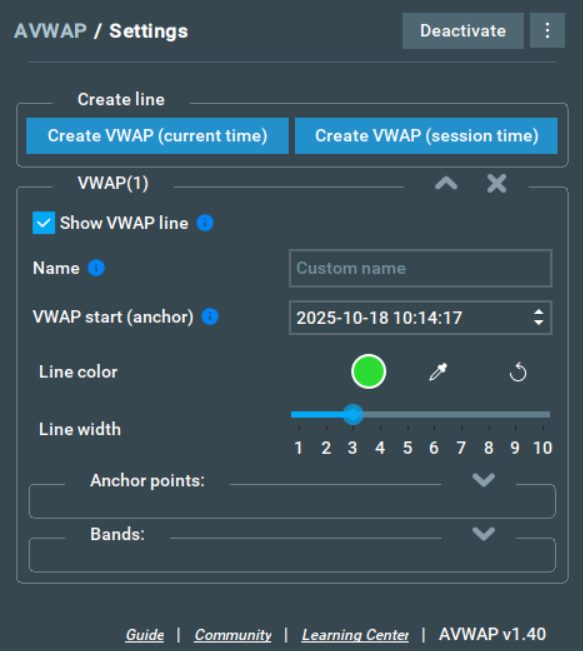
A VWAP line from your anchor: the current time, the session start, or any time you type in. Anchor points restart the calculation at chosen times, and right-clicking the line adds one. Bands are standard deviations: the usual ±1 and ±2, or custom (a coefficient of 5 draws +5 and −5).
One quirk from Bookmap’s own guide: the add-on uses your computer’s time zone, not Bookmap’s. If the two differ, your anchors shift. Check that first if a line starts in the wrong place.
How I use anchored VWAP on Bookmap
The chart platform gives me VWAP and the bands. Bookmap draws the same lines over the order book, so I can see what’s resting at them. A band is a statistical boundary, not support (the VWAP band trap). What the heatmap shows at the band tells me whether it’ll act like one today.
Anchors from a news print or the overnight high are optional extras. The exact lines, anchors and colours I run go in the settings section below, with a screenshot, once I’ve taken one that isn’t a mess.
Settings worth knowing
- Create line: from the current time or the session start; rename it, recolour it, change its width.
- Anchor points: restart the calculation at set times, or right-click the line and anchor there.
- Bands: standard bands or custom coefficients. The bands reset wherever the line resets.
- Show VWAP line: hide a line without deleting it.
Bookmap’s own AVWAP guide has the rest, with pictures.
My screen and settings
Screenshot of my own layout and the settings I run are on the way; until then, Bookmap’s picture above is the honest version.
Questions people ask
Which Bookmap plan includes AVWAP?
Global and up.
Is it the same VWAP as on my charting platform?
Same idea: price averaged by volume from the anchor. Numbers can differ a tick or two between platforms because of the data feed and the session start you choose.
Can I colour the bands separately from the line?
No. Bookmap’s guide says a line and its bands share one colour.
Next: Liquidity Marker · Back to the Bookmap Library · Which Bookmap plan?
Offer and prices as above, checked 7 November 2026. All plans and prices
Disclosure. VWAP.biz is an independent site written by Scott West, a paying member of Drysdale Trading Group™. The VWAP Wave System™ is Chris Drysdale’s work. He doesn’t own or run this site, but he has reviewed and endorsed it. Links to his book, toolkit, and community are affiliate links: if you buy through them I may earn a commission at no extra cost to you. As an Amazon Associate I earn from qualifying purchases. Nothing here is financial advice, and trading futures carries a risk of loss. Full disclosure · Risk disclaimer