
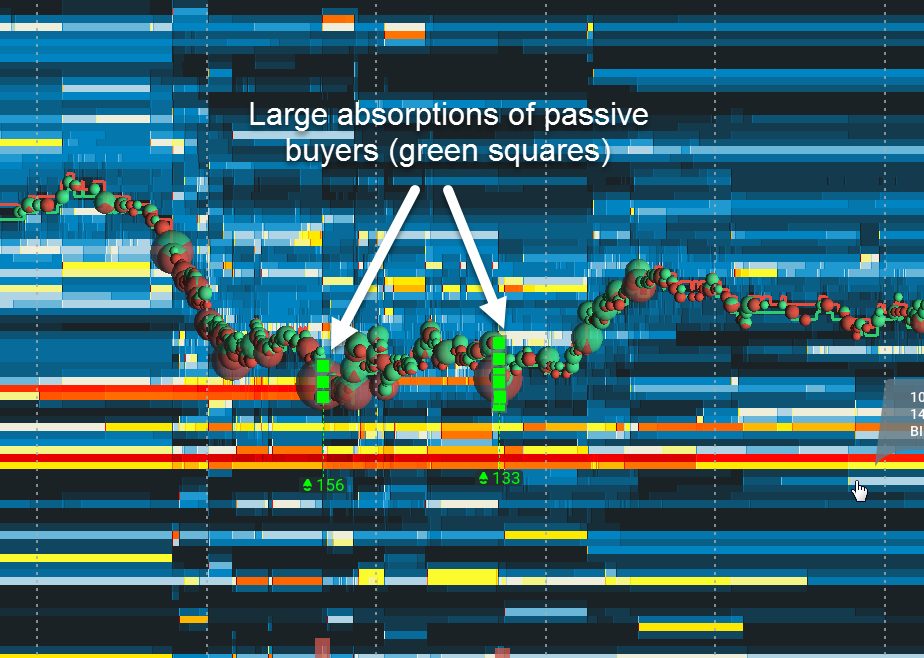
The Bookmap Absorption Indicator marks the spots where a lot of aggressive volume traded at one price in a short time and price barely moved, because resting orders soaked it up. Buys and sells are counted separately, and each burst gets a mark on the chart.
Absorption at VWAP and the bands is most of what I’m looking for on Bookmap. This add-on is the one that points at it while I’m busy looking somewhere else.
Which plan: included from Global Plus, and in Global Premium.
$147 for your first quarter or $588 for the first year (then $297 a quarter or $948 a year), 14-day money back on this offer. Prices checked 7 November 2026. All plans and prices. The free tier is a look at the software, not live futures.
Affiliate link. Bookmap pays me a commission if you subscribe; it costs you nothing extra, and I was paying full price for years before the link existed.
What does the Absorption Indicator draw?
You set a time window and a size. If more than that size trades at one price inside the window, it adds a mark. Automatic mode sets the size for you from the standard deviation of recent volume, and a multiplier slider decides how picky it is: higher means fewer marks.
It can play a sound or send a Telegram message when a new group of marks appears, so it can keep watch while you look at the other chart.
How I read absorption order flow at my levels
A level in the VWAP Wave System™ is a price where the market has to decide. Absorption is the market deciding. Red bubbles hitting a bid that doesn’t move, with an absorption mark under them, is buyers defending the price the system already chose.
That’s the wall. The trap is the opposite: no absorption, and the liquidity pulls as price arrives. Same level, different answer, different trade. Usually no trade.
Absorption alone doesn’t get me in. It upgrades a setup I already have. If the mark shows up somewhere I have no level, it’s somebody else’s problem.
Settings worth knowing
- Time and size: the two numbers that decide what counts. Too small and the chart looks like confetti.
- Automatic mode and the SD multiplier: let it size the threshold from recent volume, then turn the slider until the marks are rare enough to mean something.
- Buys and sells: set separately, because the two sides rarely behave the same.
- Alerts: a sound or a Telegram message per new group of marks.
Bookmap’s own Absorption Indicator guide has the rest, with pictures.
My screen and settings
Screenshot of my own layout and the settings I run are on the way; until then, Bookmap’s picture above is the honest version.
Questions people ask
Which Bookmap plan includes the Absorption Indicator?
Global Plus and Global Premium. It isn’t in Global or the free Digital tier.
What’s the difference between absorption and a sweep?
Absorption is a lot of volume traded at one price without moving it: a wall holding. A sweep is size that takes out several price levels at once: a wall breaking. Bookmap has a Sweeps Indicator for the second one.
Can the Absorption Indicator alert me?
Yes: a sound, a Telegram message, or both, each time a new group of marks is added.
Next: Outside Liquidity · Back to the Bookmap Library · Which Bookmap plan?
Offer and prices as above, checked 7 November 2026. All plans and prices
Disclosure. VWAP.biz is an independent site written by Scott West, a paying member of Drysdale Trading Group™. The VWAP Wave System™ is Chris Drysdale’s work. He doesn’t own or run this site, but he has reviewed and endorsed it. Links to his book, toolkit, and community are affiliate links: if you buy through them I may earn a commission at no extra cost to you. As an Amazon Associate I earn from qualifying purchases. Nothing here is financial advice, and trading futures carries a risk of loss. Full disclosure · Risk disclaimer